此前,樹莓派實驗室發布過一個開源項目 Pi Dashboard,該項目可以很直觀地展示樹莓派系統運行的各種實時數據,包括CPU、內存、磁盤占用、網絡使用等數據。
這些主要是綜合了樹莓派本身的信息進行展示,對于外部數據,例如通過外接傳感器獲取被監測點的環境數據是否能有一個框架,只需要修改少量代碼甚至無需修改就能馬上用起來呢?
下面要介紹的是“Pi Dashboard DAQ 框架”,這套方案就能實現這個需求。
本項目分為幾個部分
1、數據采集程序(后端采集部分,基于 MCC 的 daqhats 庫)
2、儀表盤WebUI(前端展現部分,PHP 程序)
文中用到的傳感器均使用模擬信號輸出,經由 MCC118 擴展板采集得到電信號
為什么使用 MCC118 擴展板呢?我可以選擇不使用它嗎?
我們選擇 MCC118 擴展板是權衡了通用與專業性、易用性和性價比三方面因素的。這款擴展板支持 -10V ~ +10V 電信號采集,支持12位分辨率8通道采集,單片總吞吐量100KS/s,能對接常用的各類傳感器。官方還專門為樹莓派提供了一套程序庫大大提高了二次開發效率和易用性。在滿足前兩方面的同級別產品中,其價格也具有一定優勢。
因項目屬于程序框架性質,我們鼓勵大家通過修改將它應用在各種實際的項目中,例如你僅僅只需要用到某些數字輸出的傳感器,那么當然可以自行編寫數據采集程序直接,從傳感器獲取數據、再將結果以符合框架所用的 JSON 格式輸出即可。同樣,如果你對所用傳感器的模擬輸出實時性要求并不高,也可以采用更低成本的 ADC 模塊來讀取傳感器信號。?
數據采集程序
這部分主要功能是讀取傳感器的電壓或數值,并用 JSON 格式輸出。使用了 web.py 框架,因為用到了 MCC118 讀取模擬信號,所以用到了 daqhats 庫。
#!/usr/bin/env python
# -*- coding: utf-8 -*-
from __future__ import print_function
import web
import json
from time import sleep
from sys import stdout
from daqhats_utils import select_hat_device, enum_mask_to_string
from daqhats import mcc118, OptionFlags, HatIDs, HatError
# Constants
CURSOR_BACK_2 = '\x1b[2D'
ERASE_TO_END_OF_LINE = '\x1b[0K'
urls = (
'/(.*)', 'hello'
)
app = web.application(urls, globals())
options = OptionFlags.DEFAULT
low_chan = 0
high_chan = 7
mcc_118_num_channels = mcc118.info().NUM_AI_CHANNELS
# Get an instance of the selected hat device object.
address = select_hat_device(HatIDs.MCC_118)
hat = mcc118(address)
class hello:
def GET(self, name):
pyDict = {0:0,1:0,2:0,3:0,4:0,5:0,6:0,7:0}
global hat
try:
# Read a single value from each selected channel.
for chan in range(low_chan, high_chan + 1):
value = hat.a_in_read(chan, options)
print('{:12.5} V'.format(value), end='')
pyDict[chan] = value
except KeyboardInterrupt:
# Clear the '^C' from the display.
print(CURSOR_BACK_2, ERASE_TO_END_OF_LINE, '\n')
web.header('Content-Type', 'application/json')
web.header("Access-Control-Allow-Origin", "*")
return json.dumps(pyDict)
if __name__ == "__main__":
try:
# Get an instance of the selected hat device object.
global address
global hat
print(' Function demonstrated: mcc118.a_in_read')
print(' Channels: {0:d} - {1:d}'.format(low_chan, high_chan))
print(' Options:', enum_mask_to_string(OptionFlags, options))
try:
input("\nPress 'Enter' to continue")
except (NameError, SyntaxError):
pass
print('\nAcquiring data ... Press Ctrl-C to abort')
except (HatError, ValueError) as error:
print('\n', error)
app.run()
儀表盤 WebUI
1、安裝 DAQ 依賴
安裝 DAQHATs 庫以及 Webserver 所依賴的組件。
sudo apt-get update
#如果已安裝過 git 客戶端可以跳過下一行
sudo apt-get install git
cd ~
git clone https://github.com/mccdaq/daqhats.git
cd ~/daqhats
sudo ./install.sh
pip install dash dash-renderer dash-html-components dash-core-components
安裝 web 框架,命令如下:
pip install web.py
2、安裝 Nginx 和 PHP7
在 Pi 的終端運行以下命令。
sudo apt-get update
sudo apt-get install nginx php7.0-fpm php7.0-cli php7.0-curl php7.0-gd php7.0-mcrypt php7.0-cgi
sudo service nginx start
sudo service php7.0-fpm restart
如果安裝成功,可通過 http://樹莓派IP 訪問到 Nginx 的默認頁。Nginx 的根目錄在 /var/www/html。
進行以下操作來讓 Nginx 能處理 PHP。
sudo nano /etc/nginx/sites-available/default
將其中的如下內容
location / {
# First attempt to serve request as file, then
# as directory, then fall back to displaying a 404.
try_files $uri $uri/ =404;
}
替換為
location / {
index index.html index.htm index.php default.html default.htm default.php;
}
location ~\.php$ {
fastcgi_pass unix:/run/php/php7.0-fpm.sock;
#fastcgi_pass 127.0.0.1:9000;
fastcgi_param SCRIPT_FILENAME $document_root$fastcgi_script_name;
include fastcgi_params;
}
Ctrl + O 保存再 Ctrl + X 退出。
sudo service nginx restart
最后重啟 Nginx 即可。
通過 GitHub 來下載 Pi Dashboard DAQ 到 Pi 上會相當方便。
cd /var/www/html
sudo git clone https://github.com/spoonysonny/pi-dashboard-daq.git
即可通過 http://樹莓派IP/pi-dashboard-daq 訪問部署好了的 Pi Dashboard DAQ。
同樣如果頁面無法顯示,可以嘗試在樹莓派終端給源碼添加運行權限,例如你上傳之后的路徑是 /var/www/html/pi-dashboard-daq,則運行。
cd /var/www/html
sudo chown -R www-data pi-dashboard-daq
注意,到這一步只能顯示樹莓派基本信息,通過數據采集到的傳感器數據還不會更新。請繼續閱讀下面步驟進一步了解如何啟動數據采集功能。
3、配置
修改 /var/www/html/pi-dashboard-daq/config.php 中 SENSOR_API_URL 常量的值,將樹莓派的IP地址替換其中 IP。
define('SENSOR_API_URL', 'http://192.168.1.42:8080/?ajax=true');
?
Web 儀表盤將獲取到的 JSON 中解析出 0-6 這7個數值,默認情況下,分別對應于儀表盤上的土壤濕度、雨水、火焰、霍爾、光線、溫度、聲音傳感器。這里可根據自己的實際需要增減和調整,修改 assets/js/dashboard.js 中相應的部分即可。
$("#sensor-sound").text(window.dashboard_sensor[6]);
$("#sensor-temp").text(window.dashboard_sensor[5]);
$("#sensor-light").text(window.dashboard_sensor[4]);
$("#sensor-hall").text(window.dashboard_sensor[3]);
$("#sensor-fire").text(window.dashboard_sensor[2]);
$("#sensor-rain").text(window.dashboard_sensor[1]);
$("#sensor-soil-humidity").text(window.dashboard_sensor[0]);
傳感器連接
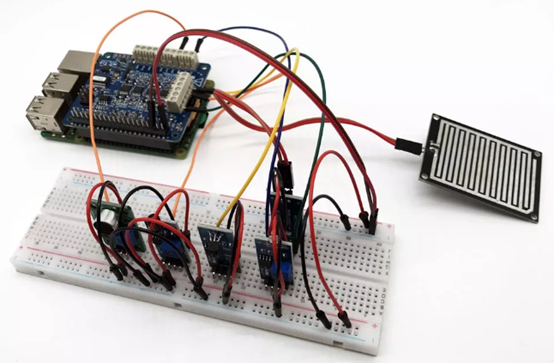
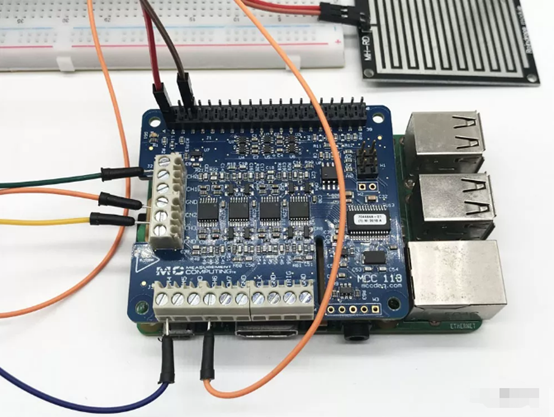
作為實驗項目,我們用面包板和跳線把傳感器和DAQ連接起來。
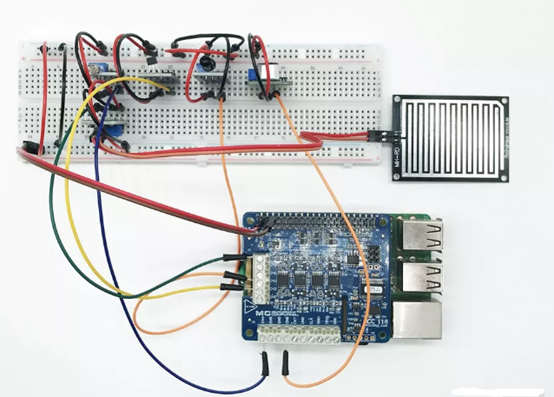
所有傳感器和樹莓派共地、VCC 均與樹莓派的 3V3 引腳相連。
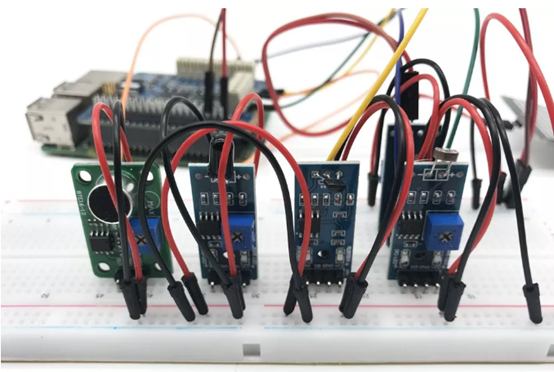
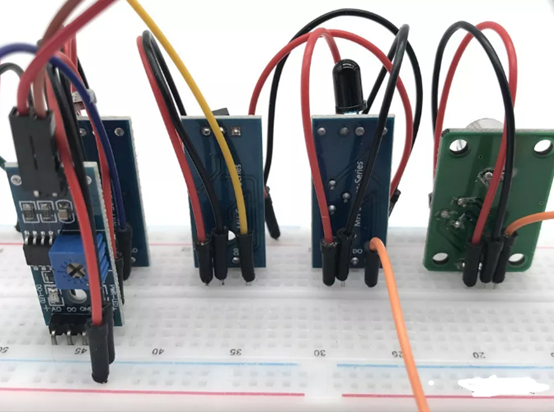
每個傳感器的 AO 模擬輸出端接到 MCC118 HAT 上的 CH0 ~ CH6。
運行
首先運行安裝目錄下 api/main.py 啟動數據采集主程序。
sudo python /var/www/html/pi-dashboard-daq/api/main.py &
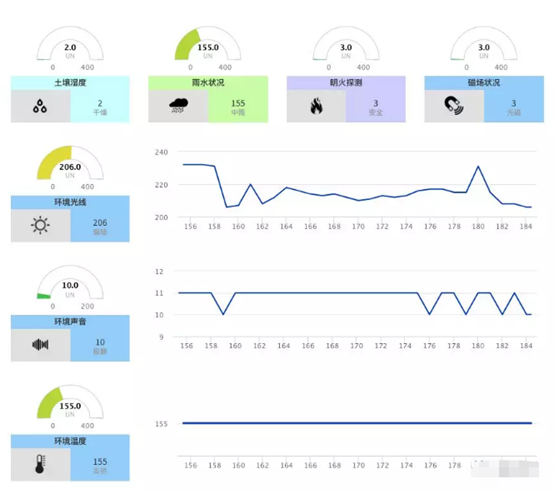
然后就可以在PC瀏覽器打開 http://樹莓派IP地址/mcc-dashboard/ 查看儀表盤了。
傳感器數值說明
目前儀表盤沒有對傳感器數據做轉換,直接從 JSON 獲得電壓數值,并通過簡單的處理將數值轉換成 0-330 之間的值,程序邏輯如下。
for(i=0;i<8;i++){
data[i] = Math.round(330-(data[i])*100,0);
}
你可以針對特定傳感器修改這里的數值轉換邏輯,將電壓數值轉換成所希望的物理量單位來顯示。